


Your EA has to run all night on your Axi (formerly AxiTrader) account. You have found three ways to host it: a broker credit, a low-cost platform VPS, or an independent server. Which one is best?
The best VPS for AxiTrader is one hosted in a financial data centre near your broker’s servers, with guaranteed resources and a latency figure you can test before you pay. We run Forex VPS Hosting with cross-connection latency from 0.3ms, and we host in data centres in London, New York, Tokyo and Singapore. Axi offers VPS options to eligible clients and also lists third-party providers. The best choice depends on your eligibility, preferred server location and the resources your trading setup needs. Pick the location closest to the server your Axi account connects to, size the plan to the number of terminals you run, and test real latency first. Below, we cover each step.
Which VPS Server Location Is Best for AxiTrader Traders?
Choose the data centre closest to the server your Axi account connects to, not the one closest to where you live. We host in London, New York, Tokyo and Singapore. Then test latency from your chosen location to your own Axi account before you commit to a plan.
In our testing, Axi’s AXITrader-US servers sit in New York, so our New York (NY4) Forex VPS is the first location to test. Our London (LD4) Forex VPS suits accounts that connect to a server in London. Facilities such as LD4 in London and NY4 in New York are widely used by brokers and liquidity providers. Hosting in the same data centre as your broker’s trading server can shorten the network path your orders travel. A direct cross-connection is only possible when both servers are in the same data centre. From any other city, latency rises with distance.
The numbers matter most for fast strategies. Our cross-connection latency starts at 0.3ms, but the figure to your own broker depends on the route, so compare tested results rather than headline numbers. A scalper or an EA that trades small price moves has the most to gain from a shorter path. A swing trader holding positions for days will notice little difference.
No provider can promise an exact figure for your account without testing it. A published number is a starting point. It is not a guarantee. You can check live latency to your broker on our broker latency page before you spend anything.
How Do I Check Which Axi Server I Am On?
Your server name appears in the login window of MetaTrader, for example AXITrader-US10-Live. Axi was formerly AxiTrader, which is why server names and the company name in the platform still say AXITrader and AxiTrader LLC. If your server is not in the table below, or you cannot find its name, ask Axi support which server your account uses before you buy a VPS.
What Latency Did We Measure to Axi’s Servers?
We tested 14 Axi MT4 servers from a New York VPS. Twelve answered in under 1ms, between 0.49ms and 0.88ms. Two were slower, AXITrader-US03-Live at 1.10ms and the AXITrader-US888-Demo server at 1.91ms, so the slowest reading was still under 2ms. The two demo servers we tested read 0.79ms and 1.91ms, so a demo test can differ from your live account.
| Server | Entity | Latency (NY VPS) |
|---|---|---|
| AXITrader-US02-Live | AxiTrader LLC | 0.85 ms |
| AXITrader-US03-Demo | AxiTrader LLC | 0.79 ms |
| AXITrader-US03-Live | AxiTrader LLC | 1.10 ms |
| AXITrader-US05-Live | AxiTrader LLC | 0.65 ms |
| AXITrader-US06-Live | AxiTrader LLC | 0.69 ms |
| AXITrader-US07-Live | AxiTrader LLC | 0.57 ms |
| AXITrader-US09-Live | AxiTrader LLC | 0.67 ms |
| AXITrader-US10-Live | AxiTrader LLC | 0.58 ms |
| AXITrader-US15-Live | AxiTrader LLC | 0.60 ms |
| AXITrader-US16-Live | AxiTrader LLC | 0.64 ms |
| AXITrader-US17-Live | AxiTrader LLC | 0.49 ms |
| AXITrader-US18-Live | AxiTrader LLC | 0.54 ms |
| AXITrader-US888-Demo | AxiTrader LLC | 1.91 ms |
| AXITrader-US888-Live | AxiTrader LLC | 0.88 ms |
The screenshots below show the same readings in the platform’s server list.
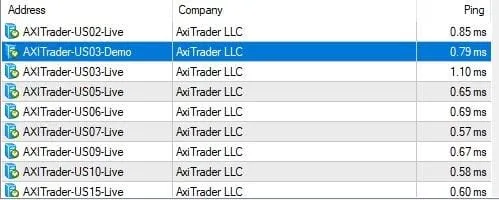
Measured latency from a New York VPS to AXITrader-US02-Live through AXITrader-US15-Live.
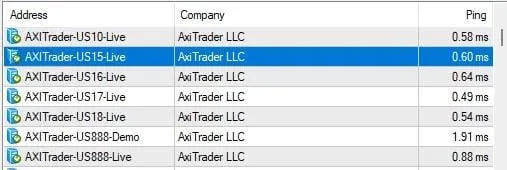
Measured latency from a New York VPS to AXITrader-US10-Live through AXITrader-US888-Live.
A practical tip before you buy: look up your server name and ask Axi if you are unsure. Results vary a little from server to server, so check your own server’s latency during a trial rather than relying on a table.
Does Axi Give Me a Free VPS, and Is It Worth Paying for My Own?
Axi offers VPS options to eligible clients, including a free VPS service in some circumstances. Its regional VPS pages also list third-party providers and a credit of up to $36 per month toward certain plans, subject to eligibility and trading-volume conditions. Check the terms applicable to your Axi account before choosing a provider. Axi states that these hosting services are owned and run by other companies.
That volume rule is worth a closer look. If you trade 0.1 lots per trade, more than 20 lots means more than 200 trades in one month. A busy EA can reach that. A slower strategy may not.
On Axi’s regional VPS page, the credit applies to the ForexVPS Basic edition with 1GB of RAM, subject to the stated trading-volume requirements. It should not be assumed to cover other plans or independent VPS providers. Another option is MetaQuotes VPS, which is designed to run MetaTrader. It may suit a single light EA, but confirm that it supports your setup and any other software you need.
Here is the trade-off. A credit depends on your monthly volume and on the providers named on Axi’s page. An independent VPS costs money from day one, but it does not depend on your trading volume. You also choose the location and the hardware, and you can run other brokers’ platforms on the same server.
What VPS Specs Does an Axi Trader Need?
For one or two EAs on a single Axi account, a plan with one CPU core and 2GB of RAM is usually enough. If you run several terminals or heavier strategies, choose more cores and RAM. Each open platform uses its own share of memory and processing power.
Every plan we run uses an AMD Ryzen 9 CPU at 4.3GHz, DDR5 RAM, NVMe storage and a 10Gbps network. Our resources are guaranteed and run on Hyper-V virtualisation, so the RAM and processor time allocated to your plan are reserved for you. These are the monthly rates when billed annually on our Forex VPS Hosting plans:
| Plan | Monthly Price | CPU | RAM | Storage |
| Standard | $17.50 | 1 core, 4.3GHz | 2GB DDR5 | 30GB NVMe |
| Standard+ | $22.11 | 2 cores, 4.3GHz | 2.5GB DDR5 | 35GB NVMe |
| Advanced | $33.75 | 2 cores, 4.3GHz | 4GB DDR5 | 40GB NVMe |
| Expert | $63.75 | 4 cores, 4.3GHz | 8GB DDR5 | 50GB NVMe |
The Expert plan costs about 3.6 times the Standard price. For that, you get four times the cores and four times the RAM.
How Do I Set Up a VPS for My Axi Account?
Setup takes four steps. Connect to your VPS with Remote Desktop, install MetaTrader 4 or 5, log in with your Axi account details, then load your EA and test it on a demo account first. Once it runs correctly, you can close the connection, and the platform keeps running.
Our servers run Windows Server, so MetaTrader installs the same way it does on a home PC. Two details save trouble later. Set the platform to restart automatically after a server reboot. Then check that your EA’s files and settings copied across fully before you go live. If you want more detail on running EAs around the clock, read our Expert Advisor hosting guide.
Server management is part of the plan, not an extra. Every plan includes cloud anti-virus and malware protection, off-site backups taken four times a week, and 24/7 support from a team that knows MT4 and MT5. We also publish a 99.99% uptime commitment, which excludes scheduled maintenance.
Before You Choose a Plan
The most common worry is paying for a VPS and finding it does not fit your trading. Our monthly VPS plans include a 30-day money-back guarantee, subject to the applicable terms. Dedicated servers are excluded. You can also test latency from your chosen location on a short trial before you commit to a full year.
Get Started With a Forex VPS Built for Axi Traders
If you want to see your real latency to Axi before you commit, start with a trial. Start your 7-day Forex VPS trial for $3.99 and run your own account from New York, or from London if your account connects to a server there.
Frequently Asked Questions
Should I choose a London or New York VPS for Axi?
In our tests, Axi’s AXITrader-US servers answered in under 2ms from a New York VPS, so New York is the first location to test. Check your server name in the MetaTrader login window, or ask Axi, before you buy a VPS.
Can I run a demo and a live Axi account on the same VPS?
Yes. It is a good habit, because you can test every EA change on the demo terminal before you touch the live one. Each terminal uses memory, so plan your RAM for both.
Will Axi’s monthly credit apply if I use an independent VPS?
Axi describes the credit for specific named providers, not for independent hosts, so do not assume it applies. Read Axi’s current terms before you count on it for any other host.
Will a VPS stop slippage on my Axi trades?
No. It shortens the delay between your platform and the broker. Slippage also depends on market volatility and liquidity at the moment you trade.
Which location should I choose if I trade the Asian session?
Choose the location closest to your account’s server, whatever session you trade. In our tests Axi’s US servers answered in under 2ms from New York, so New York is the first location to test even for Asian-hours trading. Test Tokyo or Singapore only if Axi confirms that your account connects to a server there.
What should I do if my latency looks higher than the published figure?
Test again at a different time of day, because latency can change between sessions. If it stays high, contact our support team with the times and figures.