


You set up a forex VPS so your Expert Advisors keep running while you sleep. Within days, you notice login attempts in the event log from countries you have never visited.
That is normal. It is also why a forex VPS needs security, not just speed. The server holds your broker logins, EAs, scripts, and trading data. Weak protection puts your capital within reach of automated attacks.
This guide explains how to secure a forex VPS step by step. It covers Remote Desktop access, firewalls, anti-malware, DDoS protection, and backups, without turning the setup into a full-time IT project.
How do you keep a forex VPS secure?
To keep a forex VPS secure, start with a strong, unique Remote Desktop password and restrict who can log in. Then keep Windows and your trading platforms updated, enable a firewall and anti-malware, and turn on your provider’s DDoS protection. Together, these layers protect your accounts and capital from the most common attacks.
A secure forex VPS setup covers four areas:
| Area | Core steps |
| Access control | Strong unique RDP password, limited user accounts, IP restrictions |
| Maintenance | Windows updates, updated MT4/MT5 and trading software |
| Protection | Windows Firewall enabled, active anti-malware, provider DDoS protection |
| Recovery | Regular backups or snapshots, careful credential handling, login monitoring |
Security is not only for large trading firms. A single trader on a virtual private server faces the same threats that target any internet-connected machine. These include automated password attacks, malware, leaked credentials, and careless access sharing.
The goal is a trading environment that stays fast, stable, and protected.
How should you lock down Remote Desktop access?
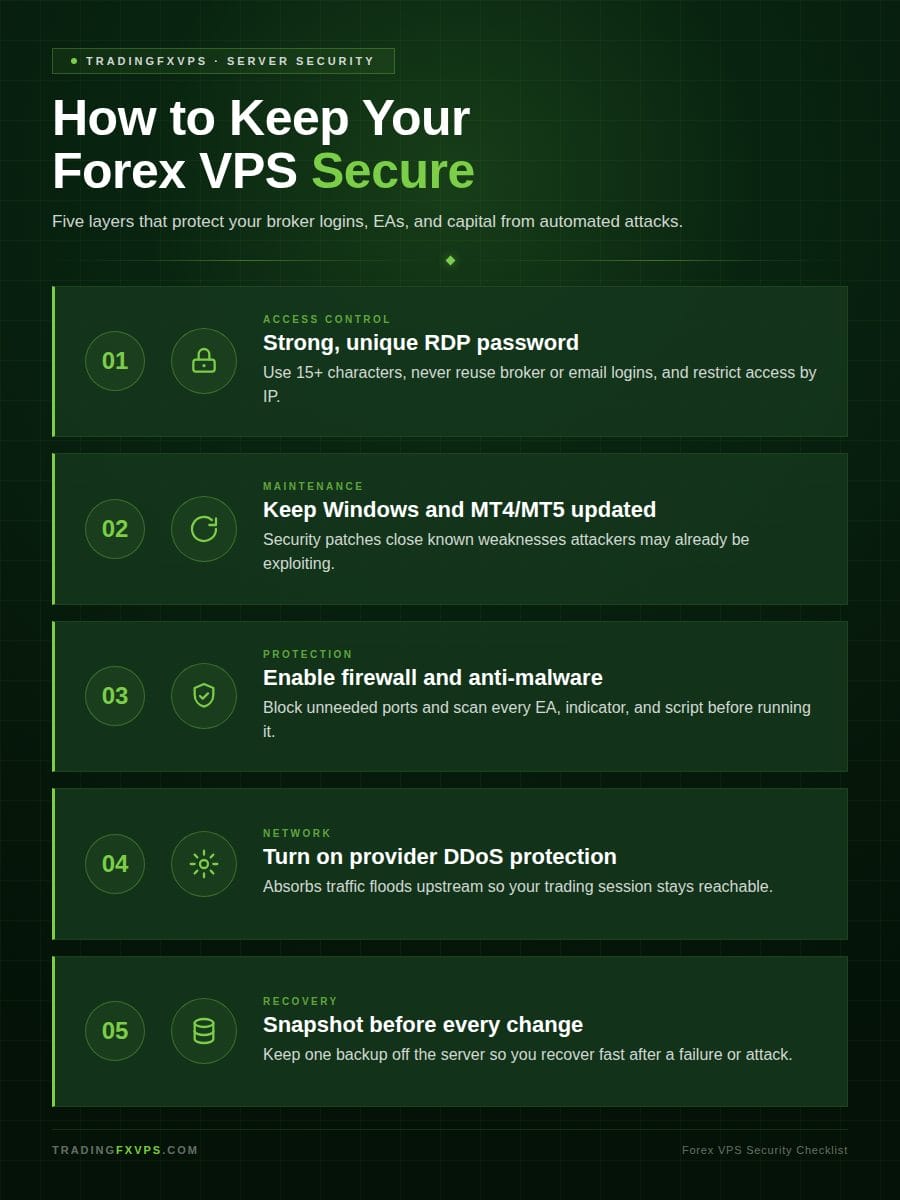
Lock down Remote Desktop with a long, unique password, limited access, and Network Level Authentication. Remote Desktop is how most traders reach a Windows VPS. That also makes it the most attacked entry point.
The threat is not theoretical. Security researchers exposed an RDP server to the internet and recorded brute-force login attempts beginning in under one minute. The server logged more than 2 million failed logins over 15 days (Source: Sophos, 2024).
Remote Desktop is the front door of your forex VPS. It is worth locking properly.
How do you use strong login credentials?
Use a long, unique password for the Windows account. Never reuse your broker, email, or old VPS password. Reused and weak credentials are the single most common way attackers brute-force their way into RDP.
A strong VPS password meets five rules:
| Rule | Why it matters |
| At least 15 characters | Defeats dictionary and brute-force attempts |
| Unique to the VPS | Limits damage if another account leaks |
| Not based on your name or broker | Removes easy-to-guess targets |
| Stored in a password manager | Avoids plain-text exposure |
| Changed if shared or exposed | Closes access after anyone else has it |
Avoid default usernames like admin, trader, or test. These dominate brute-force attempts. On one exposed server, the username “administrator” alone drew 866,862 failed login attempts in 15 days (Source: Sophos, 2024). Use a less obvious username if your VPS service allows it.
Change the password if anyone previously helped set up your server. This includes freelancers, signal sellers, EA installers, or anyone who briefly needed access.
How do you limit who can access your VPS?
Limit access by keeping a single administrator account and restricting Remote Desktop to approved IP addresses. Fewer doors mean fewer ways in.
Ask your VPS provider whether they can restrict Remote Desktop access by IP address. Only approved connections then reach the login screen. You can also use firewall rules to limit access and cut exposure to random login attempts from the public internet.
Good access habits include:
- Do not share RDP credentials casually
- Remove users you no longer need
- Log out when finished
- Review failed login attempts
- Avoid public Wi-Fi when accessing the server
- Use a VPN or secure network where practical
Remote access should feel boring. If several people, countries, and devices are logging in, the risk goes up.
Should you enable Network Level Authentication?
Yes, enable Network Level Authentication whenever it is available. Network Level Authentication (NLA) requires a user to authenticate before a full Remote Desktop session is established. This blocks unauthenticated connections before they consume server resources.
The table below summarizes the four core Remote Desktop settings.
| Setting | Action | Why it matters |
| Password length | Use 15+ characters, unique to the VPS | Defeats dictionary and brute-force attempts |
| Username | Avoid admin, trader, test | Removes the most-guessed targets |
| IP restriction | Limit RDP to approved addresses | Hides the login screen from the open internet |
| Network Level Authentication | Enable where supported | Stops unauthenticated sessions early |
NLA is a basic setting. It is worth confirming during setup.
How do updates, firewall, and anti-malware help?
Updates, firewalls, and anti-malware each close a different gap. Updates close known weaknesses. Firewalls block unwanted connections. Anti-malware catches malicious files before they reach your trading platforms.
A forex VPS is still a Windows server. It needs the same basic maintenance even when it only runs trading software. External remote services such as RDP were the most common way attackers first broke into networks, accounting for 65% of incident-response cases in one 2023 analysis (Source: Sophos, 2024).
How often should you update Windows and trading software?
Update Windows and your trading software as security patches are released. Each patch closes a weakness attackers may already be exploiting. Outdated remote-access and platform software is a known and repeated target.
Keep these components current:
| Component | Examples |
| Trading platforms | MT4, MT5, broker platform files |
| Automation tools | Trade copiers, Expert Advisor files, indicators |
| Access and support software | Remote access tools, browser software if installed |
Schedule updates during quiet trading periods. Avoid restarting the server while trades are open unless necessary. If your platforms run automated strategies, test updates on a demo or secondary environment first. Some EAs and indicators behave differently after platform changes.
How should you use the firewall?
Keep Windows Firewall enabled. It controls which connections are allowed into and out of the VPS. A basic trading setup needs only a few open services and almost no inbound ports.
Remote Desktop is the common inbound need. Your trading platform needs outbound access to the broker and market-data systems. You normally do not need to open random inbound ports.
| Security area | What to do | Why it matters |
| Remote Desktop | Limit access where possible | Reduces unwanted login attempts |
| Windows Firewall | Keep it enabled | Blocks unnecessary traffic |
| Anti-malware | Keep protection active | Helps detect malicious files |
| Windows updates | Install security patches | Fixes known vulnerabilities |
| Broker credentials | Store carefully | Protects trading accounts |
| Backups | Create snapshots | Helps recovery after failure |
Ask your VPS hosting provider before changing rules if you are unsure whether a firewall change is needed. Opening the wrong port can create unnecessary risk.
Do you need anti-malware on a trading VPS?
Yes, anti-malware is necessary on a trading VPS. It protects the server from suspicious files, scripts, and downloads. Traders install EAs, indicators, trade copiers, and scripts from outside sources, and not all of them are safe.
Follow these download rules:
- Only download trading software from trusted sources
- Scan files before running them
- Avoid cracked EAs and “free” signal tools
- Reject unknown installers that demand administrator access
A reliable forex VPS is not only one with strong uptime. It is also one that keeps harmful software away from your trading operations.
How do DDoS protection and provider safeguards help?
DDoS protection and provider safeguards keep your server reachable when attackers flood the network with traffic. A DDoS attack overwhelms a server, service, or network. For traders, the result is interruption: disconnection, poor performance, or temporary loss of access.
The scale of this threat keeps climbing. Cloudflare mitigated 21.3 million DDoS attacks in 2024, a 53% increase over the previous year (Source: Cloudflare, 2024). Provider-level protection absorbs that traffic before it reaches your trading session.
What should a forex VPS provider protect?
A forex VPS provider should protect the surrounding network infrastructure, not just the virtual server itself. The network path to your server matters as much as the server.
Look for these provider safeguards:
| Safeguard | What it delivers |
| DDoS protection | Absorbs traffic-based attacks upstream |
| Redundant network connections | Keeps the server reachable if one route fails |
| Reliable data center locations | Supports stable latency and uptime |
| Monitoring and alerts | Flags problems before they cause downtime |
| Fast support response | Shortens time to resolution |
| Clear uptime commitments | Sets a measurable reliability standard |
| Secure account portal access | Protects the control panel and billing |
A low-latency VPS is useful, but security and reliability must come with it. Fast hosting does not help if the server is unstable or poorly protected.
Does DDoS protection stop every problem?
No, DDoS protection does not stop every problem. It defends against traffic-based attacks. It does nothing for weak passwords, leaked broker logins, unsafe EAs, or careless account sharing.
Provider safeguards are one layer of defense, not the whole wall. Your login security, software hygiene, and backup habits carry the rest.
Compare both performance and protection when choosing a forex VPS. The best forex VPS for trading supports speed, security, and uninterrupted execution together.
How do backups help if something goes wrong?
Backups give you a way to recover when the server breaks, software fails, or a setup mistake causes problems. A backup will not stop an attack. It shortens the time it takes to get back to trading after one.
Backups also matter because some attacks are designed to destroy access. Attackers who breach a server often deploy ransomware that encrypts critical data and demands payment. An off-server copy is the difference between recovery and loss (Source: ReliaQuest, 2025).
What should you back up?
Back up the parts of the VPS that would be difficult to rebuild. Configuration and settings take longer to recreate than the software itself.
| Backup category | Items |
| Platform profiles | MT4 and MT5 profiles, templates |
| Strategy files | EA settings, indicator files, trade copier settings |
| Licenses and records | License files, important logs |
| Configuration notes | Broker server details, platform configuration notes |
Do not store plain-text broker passwords in an obvious file on the desktop. If you need to keep credentials, use a secure password manager instead.
How often should you create backups?
Create a snapshot before any major change. Back up active setups on a regular schedule. Timing your backups around changes is what makes recovery clean.
| Trigger | Backup action |
| Platform update | Snapshot before installing |
| EA or trade copier install | Snapshot before running |
| Windows configuration change | Snapshot before applying |
| Active automated trading | Weekly or monthly, based on change frequency |
Keep at least one copy away from the VPS. If the virtual server becomes inaccessible, an off-server copy makes recovery far easier.
Explore a forex VPS plan if you want help choosing a secure, low-latency setup. TradingFXVPS (tradingfxvps.com) provides forex VPS hosting built for traders. Contact our team to compare resources, location, and protection before you order.
Frequently asked questions
Can someone hack my trading VPS?
Yes, any internet-connected server can be attacked. Strong passwords, restricted login access, updates, anti-malware, firewall rules, and careful software downloads reduce the risk significantly. Attacks are automated and constant rather than personal, so layered defenses matter more than staying unnoticed.
Should I change the default RDP port?
Changing the default RDP port may reduce noisy automated scans, but it is not real security by itself. Strong credentials, limited access, firewall rules, and account lockout policies matter far more. Treat a port change as minor hardening rather than a substitute for the core steps, since attackers can still find a moved port with a quick scan.
Is two-factor login possible on a VPS?
Yes, two-factor login is possible on a VPS, though the method depends on your provider and Windows configuration. Common options include provider account MFA, a Remote Desktop Gateway, VPN-based MFA, or third-party tools. Ask your hosting provider which options they support, and confirm it works on a test login before you depend on it.
How strong should my VPS password be?
Your VPS password should be at least 15 characters, unique to the server, and unrelated to your name or broker. Length and uniqueness defeat the dictionary and brute-force methods attackers use most. Store it in a password manager rather than reusing one you already use elsewhere, and change it immediately if anyone else ever had access.
Do I still need anti-malware if I only run MT4 or MT5?
Yes, you still need anti-malware even if you only run MT4 or MT5. Most risk on a trading VPS comes from third-party EAs, indicators, and trade copiers downloaded from outside sources. Scan every file before running it, and avoid cracked or “free” tools that ask for administrator access, since legitimate uptime does not protect you from a malicious script.
What happens to my trades during a DDoS attack?
During a DDoS attack, you may experience disconnection, lag, or temporary loss of access to your server. Open positions remain at your broker, but you can lose the ability to manage them in real time. Provider DDoS protection reduces this risk by absorbing attack traffic upstream, and a provider with redundant network connections adds another layer of resilience.
How often should I back up my forex VPS?
Back up before any major change, and on a weekly or monthly schedule for active automated trading. The right frequency depends on how often your setup changes. Always keep at least one copy off the server, so an off-server backup lets you rebuild quickly if the VPS becomes inaccessible.
Is a cheap forex VPS less secure?
A cheap forex VPS is not automatically less secure, but price often reflects what protection is included. Check whether DDoS protection, monitoring, redundant networks, and support response are part of the plan. Compare protection alongside latency and price rather than choosing on cost alone, since reliability and security are part of the real value of a trading VPS.