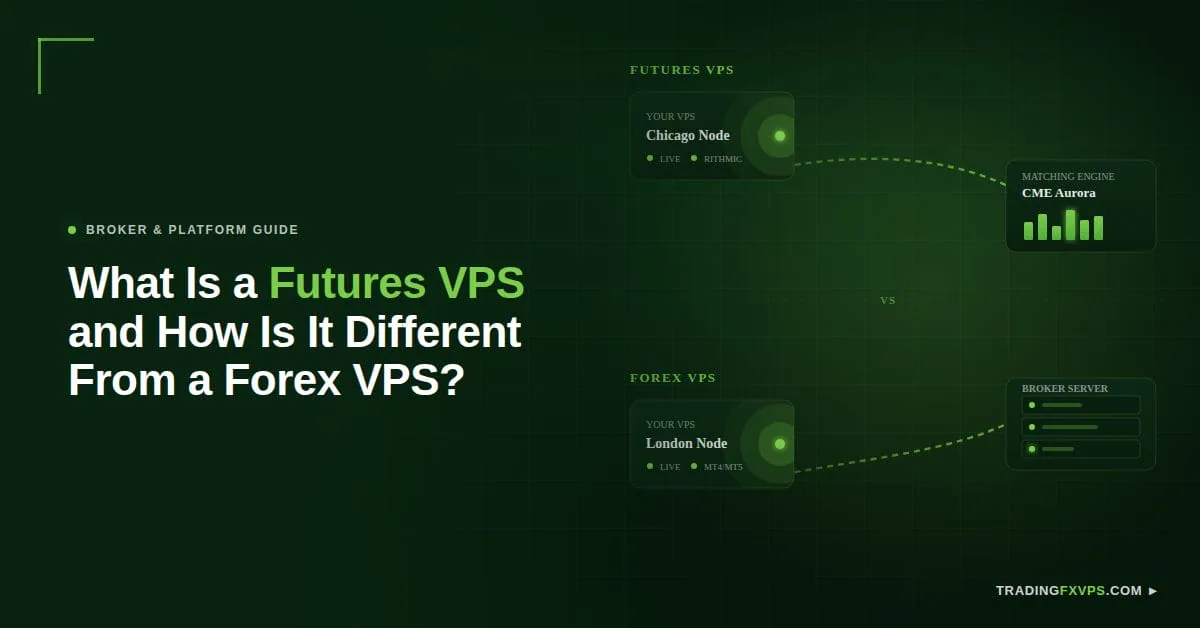
You set up automated trades that fill cleanly in testing, then watch them slip during live sessions. The problem is often not your strategy. It is where your server sits in relation to the market you trade, and a futures VPS solves this differently than a forex VPS because the two markets route orders to different destinations.
This guide explains what a futures VPS is, how it differs from a forex VPS, where each should be located, which platforms each supports, and how to decide whether one server can cover both markets.
What Is a Futures VPS and How Does It Differ From a Forex VPS?
A futures VPS is a virtual private server hosted near a futures exchange’s matching engine, such as CME in Aurora, Illinois, to minimize execution latency for platforms like CQG and Rithmic. A forex VPS instead sits near retail broker servers in hubs like London and New York.
The main difference is the destination of the order.
A futures order usually travels toward an exchange, data feed, or order-routing network. A forex order usually travels toward the broker’s trading server. That single difference changes the best VPS location, platform setup, and performance priorities.
VPS Type
Main Destination
Common Platforms
Best Location Focus
Futures VPS
Exchange matching engine or futures routing network
NinjaTrader, Rithmic, CQG, Sierra Chart
Near CME Aurora or relevant exchange infrastructure
Forex VPS
Broker server or liquidity hub
MetaTrader, cTrader, broker platforms
Near broker servers in New York, London, Frankfurt, or similar hubs
Mixed VPS
Both futures and forex systems
Multiple trading platforms
Chosen by the most latency-sensitive market
A futures VPS is not web hosting with a trading label. It is a server configured for trading software, low latency, uptime, and stable remote desktop access. Latency matters because algorithmic and high-frequency systems can react to price changes in under a millisecond, so even small network delays affect fills (Source: CME Group, 2024).
Where Should Each Type of VPS Be Located?
The right VPS location depends on where your orders and market data need to travel, not on where you live. Place the server near the system your orders reach last: the exchange for futures, the broker for forex.
Where Should a Futures VPS Be Located?
A futures VPS should be located near the exchange that hosts your contracts, which for CME products means Aurora, Illinois. CME’s data center in Aurora houses the matching engines for Globex products, making proximity to a CME Aurora futures VPS important for latency-sensitive futures trading.
A futures VPS near that infrastructure can reduce network latency between the trader’s platform, data feed, and order-routing systems. The VPS location with the lowest latency to CME sits closest to Aurora, and CME Globex processes billions of messages on peak trading days, so the distance between your server and the matching engine has a measurable effect on order timing (Source: CME Group, 2024).
Low-latency placement matters most for these futures use cases:
Futures Use Case
Why Low Latency Matters
Scalping
Quick entries and exits mean small delays affect fills, slippage, and timing
Order-flow trading
Fast-changing bid, ask, volume, and liquidity data stays more current
Automated trading
Systems depend on fast execution across platform, broker, and exchange path
Algorithmic strategies
Algorithms react within milliseconds, so a nearby VPS reduces avoidable delay
Fast data feed processing
Timely market data supports decisions on accurate price movement
High-speed chart updates
Charts reflect current activity more smoothly during volatile sessions
Tight entry and exit setups
Tight setups leave less room for delay, slippage, or missed levels
The closer the VPS is to the exchange path, the less avoidable delay the setup adds.
Where Should a Forex VPS Be Located?
A forex VPS should be located near the broker’s server, not near the trader. Many forex brokers run infrastructure in financial hubs, and the goal is to shorten the path between your platform and the broker’s matching system.
Common forex broker server hubs include:
New York
London
Frankfurt
Tokyo
Singapore
A forex trader in Asia using a broker server in London may get better execution from a London VPS than from a local server. The same logic applies to New York-based broker servers. Slow execution and slippage are a measurable cost, and trading latency tied to VPS location has been linked to worse average fill prices, which compounds across high-frequency EA trading.
Which Platforms Is Each VPS Built For?
Futures and forex traders often run different trading software, which affects CPU, RAM, Windows settings, and support needs. The platform you run sets the resource floor for your VPS plan.
Which Platforms Use a Futures VPS?
A futures VPS commonly runs platforms that connect directly to exchange data feeds and routing networks. These setups are often CPU-heavy because of charting, market depth, and automation.
Futures Platform or Tool
What It Handles
Primary Resource Demand
NinjaTrader
Charting, automation, order execution
CPU during multi-chart sessions
Rithmic
Low-latency data feed and routing
Network latency and CPU
CQG
Market data and execution
CPU and stable connection
Sierra Chart
Advanced charting and order flow
CPU for heavy chart loads
Trading Technologies
Professional order routing
Network and CPU
Automated strategies
Algorithmic execution
CPU for fast reaction
These platforms need strong CPU performance, especially when many charts, indicators, bots, or market depth tools run at once. For active futures traders, CPU stability can matter as much as RAM, and a fast AMD Ryzen or similar high-performance processor helps keep the platform responsive during busy sessions.
Which Platforms Use a Forex VPS?
A forex VPS commonly runs MetaTrader and broker-native platforms built around expert advisors and trade copiers. A complete automated forex VPS setup can stay light with one terminal but scale up quickly with multiple accounts.
Forex Platform or Tool
What It Handles
Primary Resource Demand
MetaTrader (MT4 and MT5)
Charting, EAs, broker execution
RAM as terminals multiply
MT4 expert advisors
Automated rule-based trading
CPU per active EA
MT5 automated strategies
Multi-asset automation
CPU and RAM
Trade copiers
Mirroring trades across accounts
RAM for multiple terminals
Forex bots
Continuous automated execution
CPU during active sessions
Multi-account setups
Running several terminals at once
RAM and CPU combined
Forex platforms are often lighter than futures setups, but resource usage still rises quickly. Multiple charts, several EAs, and many terminals place real pressure on the server.
The best VPS is the one sized for your real workload, not the one that looks fine when a single empty platform is open.
Who Should Choose Which VPS?
Choose your VPS based on the main market you trade, then optimize its location for that market’s destination. Your primary market determines whether exchange-side speed or broker-side speed comes first.
Who Should Choose a Futures VPS?
Choose a futures VPS if you mainly trade futures contracts and depend on fast access to futures exchange infrastructure. A futures VPS is usually the better fit when trading performance hinges on exchange-side speed.
Who Should Choose a Forex VPS?
Choose a forex VPS if you mainly trade currency pairs through a forex broker. A forex VPS should be selected by broker latency first, with the server sitting near the broker’s infrastructure rather than just in a popular data center.
This table matches each trader profile to the right VPS type:
Your Trading Profile
Best Fit
Trade CME futures contracts
Futures VPS
Use Rithmic or CQG connections
Futures VPS
Run NinjaTrader or Sierra Chart
Futures VPS
Trade short time frames or scalp futures
Futures VPS
Need lower latency to CME
Futures VPS
Trade currency pairs through a forex broker
Forex VPS
Run MetaTrader with MT4 or MT5 EAs
Forex VPS
Copy trades across multiple accounts
Forex VPS
Need broker-side low latency
Forex VPS
Use forex automation or bots
Forex VPS
What Specs Should You Start With?
Your starting plan depends on platform load, so size CPU and RAM to your real setup rather than the minimum. A VPS that runs near its resource limit can slow down during active trading hours.
Setup
Suggested CPU
Suggested RAM
Best For
Light forex setup
1 to 2 cores
2 to 4 GB
One or two MetaTrader terminals
Active forex setup
2 to 4 cores
4 to 8 GB
Multiple terminals or EAs
Light futures setup
2 to 4 cores
4 to 8 GB
One charting platform and data feed
Active futures setup
4+ cores
8 to 16 GB
NinjaTrader, Rithmic, bots, and several charts
If your setup includes heavy charts, automation, or trading bots, choose more CPU and RAM than the minimum.
Can One VPS Serve Both Markets?
Yes, one VPS can serve both futures and forex markets, but it is not always ideal. The limiting factor is location, because a single server cannot sit close to both CME in Aurora and a forex broker server in London at the same time.
A VPS near CME is excellent for futures but adds latency for a London broker. A London forex VPS works well for forex but adds unnecessary latency for CME futures. The decision comes down to which market is more latency-sensitive.
When Is One VPS Enough?
One VPS is enough when a single market clearly dominates your trading and the second market tolerates higher latency. The shared server works as long as both platforms stay stable and tested latency is acceptable.
For example, a trader can run a futures platform and a small MetaTrader setup on the same Windows VPS when both remain stable.
When Should You Use Separate VPS Setups?
Use separate VPS setups when both markets are actively traded and each needs a different location or automation stack. Separation also protects you when a crash in one market could otherwise take down accounts in the other.
This table compares when one VPS works against when you should split into two:
Factor
One VPS Is Enough
Use Separate VPS Setups
Market priority
One market clearly dominates
Both markets are actively traded
Location needs
One location serves the main market
Each market needs a different location
Automation
Second market is mostly manual
Automated trading runs in both markets
CPU load
Platforms do not overload the server
CPU usage becomes high
Risk
A shared crash is acceptable
A crash must not affect both accounts
Latency
Both routes test acceptably
Each market needs its own low-latency route
A dedicated server can make sense for very heavy workloads with many charts, bots, and automated strategies, though most traders do not need that at first.
Conclusion: Which VPS Should You Choose?
Choose a futures VPS if your performance depends on exchange-side speed, and choose a forex VPS if it depends on broker-side speed. The market you trade most sets the location, and the location sets everything else.
Decision Point
Futures VPS
Forex VPS
Order destination
Exchange matching engine
Broker server
Best location
Near CME Aurora or relevant exchange
Near broker server hub
Core platforms
NinjaTrader, Rithmic, CQG, Sierra Chart
MetaTrader, MT4/MT5 EAs, copiers
Latency priority
Exchange-side
Broker-side
When both markets are active and latency-sensitive, run separate VPS setups so each stays optimized for its destination.
Ready to Match a VPS to Your Market?
Pick your VPS by destination first, then size CPU and RAM to your real workload. The right server should support your trading style without adding avoidable latency or technical problems.
TradingFXVPS helps you compare location, resources, and platform needs before you commit to a plan. Get in touch with our team and we will help you match a futures VPS, forex VPS, or both to the markets you trade.
FAQ
Is CME Aurora Hosting Only for Futures?
CME Aurora hosting is mainly relevant to futures and options products traded through CME Globex. It can also matter for CME-listed products across asset classes such as equity indexes, metals, energy, rates, FX, and crypto futures.
Can I Trade Forex and Futures on One VPS?
Yes, you can trade forex and futures on one VPS if the server has enough CPU, RAM, storage, and platform compatibility. Test latency for both the futures connection and the forex broker before relying on one setup.
Does Futures Trading Need Lower Latency Than Forex?
Not always, because it depends on the strategy. Fast futures scalping, order-flow trading, and algorithmic trading may need ultra-low latency, while slower futures trades may not. Forex scalping and EA trading can also be latency-sensitive when order timing matters.
How Much RAM Does a Trading VPS Need?
A light forex setup runs on 2 to 4 GB, while an active futures setup with NinjaTrader, bots, and several charts needs 8 to 16 GB. Choose more than the minimum if you run heavy automation, because a server near its limit slows during active hours.
Does a Futures VPS Reduce Slippage?
A futures VPS near the exchange can reduce avoidable network latency, which helps with fill timing. It does not eliminate slippage caused by market volatility or liquidity, since those depend on market conditions rather than server location.
What Operating System Does a Trading VPS Use?
Most trading VPS plans run Windows because MetaTrader, NinjaTrader, and similar platforms are built for it. Windows also supports stable remote desktop access, which lets you monitor and manage the platform from any device.