


Managing multiple accounts becomes difficult when every order has to be opened, adjusted, and closed manually. A trade copier automates that process by transferring trading instructions from one account to several others.
However, the copier must remain online and connected to every account it manages. Running it on a VPS provides a stable, always-on environment that does not depend on a trader’s home computer or internet connection.
So, what is a forex trade copier VPS setup, and how does it improve trade replication? This guide explains how the software works, why latency matters, and what to consider when choosing a server.
What Is a Forex Trade Copier?
A trade copier is software that replicates trades from one MetaTrader account to others in real time. Running it on a VPS keeps the copier online 24/5 and close to the broker, so copied orders execute with minimal delay and price difference between accounts.
One trading account serves as the source of the original orders. When the trader opens, modifies, or closes a position on that account, the copier sends matching instructions to the connected accounts.
The software may also apply different lot sizes and risk settings to each destination. This allows a trader to manage accounts with different balances without entering every order separately.
A virtual private server provides a remote computer where MT4, MT5, and the copier can continue running throughout the forex trading week. The software remains active even when the trader’s personal computer is switched off.
This type of trade copier setup is commonly used by account managers, signal providers, prop firm traders, and anyone scaling the same trading strategy across several accounts.
How Trade Copiers Work From Master to Slave
Most copier systems follow a master-to-slave structure. The terms describe how trading instructions move between accounts rather than who owns them.
The Master Account Creates the Trade
The master account is where the original forex trade is placed. It may be opened manually by a trader or automatically by an EA.
A local trade copier normally uses a sender EA installed on the master MT4 or MT5 terminal. The sender monitors the account and detects events such as:
- New market and pending orders
- Stop-loss or take-profit changes
- Partial position closes
- Full position closures
- Changes to pending-order prices
The copier does not move the actual position between accounts. It sends the information required to replicate that position elsewhere.
The Receiving Accounts Copy the Instructions
The destination accounts, also called follower, receiver, or slave accounts, run a receiver EA. This EA reads the master account’s instructions and places matching orders through each account’s own broker.
Trade copier software may offer several settings, including:
- Fixed lot sizing: Every copied trade uses the same volume.
- Proportional sizing: Lot sizes adjust based on each account’s balance or equity.
- Risk controls: A receiver account with half the master’s balance may copy at half the original trade size.
- Symbol mapping: The copier matches different broker symbols, such as EURUSD, EURUSD.a, or EURUSD-pro.
These controls help ensure trades are copied to the correct instrument without exposing smaller accounts to excessive risk.
Why Latency Matters for Copy Accuracy
Latency is the delay between an action on the master account and its replication on the destination account. Lower latency allows the receiving platform to respond more quickly.
Imagine that the master buys EUR/USD at 1.15000. During the brief time required to transmit and execute the copied instruction, the market could move to 1.15005. The destination receives a slightly different entry price.
Small differences are normal because different brokers can provide different prices, liquidity, and execution conditions. No copier can guarantee identical fills across every account.
However, unnecessary delay can make the difference larger, which is why a low latency VPS reduces slippage. This is particularly important for scalping, news trading, and other short-term systems that depend on fast entries and exits.
A forex VPS can improve execution speed by placing the trading platforms in a data center near the broker’s server. Stable connectivity also reduces the risk of orders being missed because of a home internet interruption.
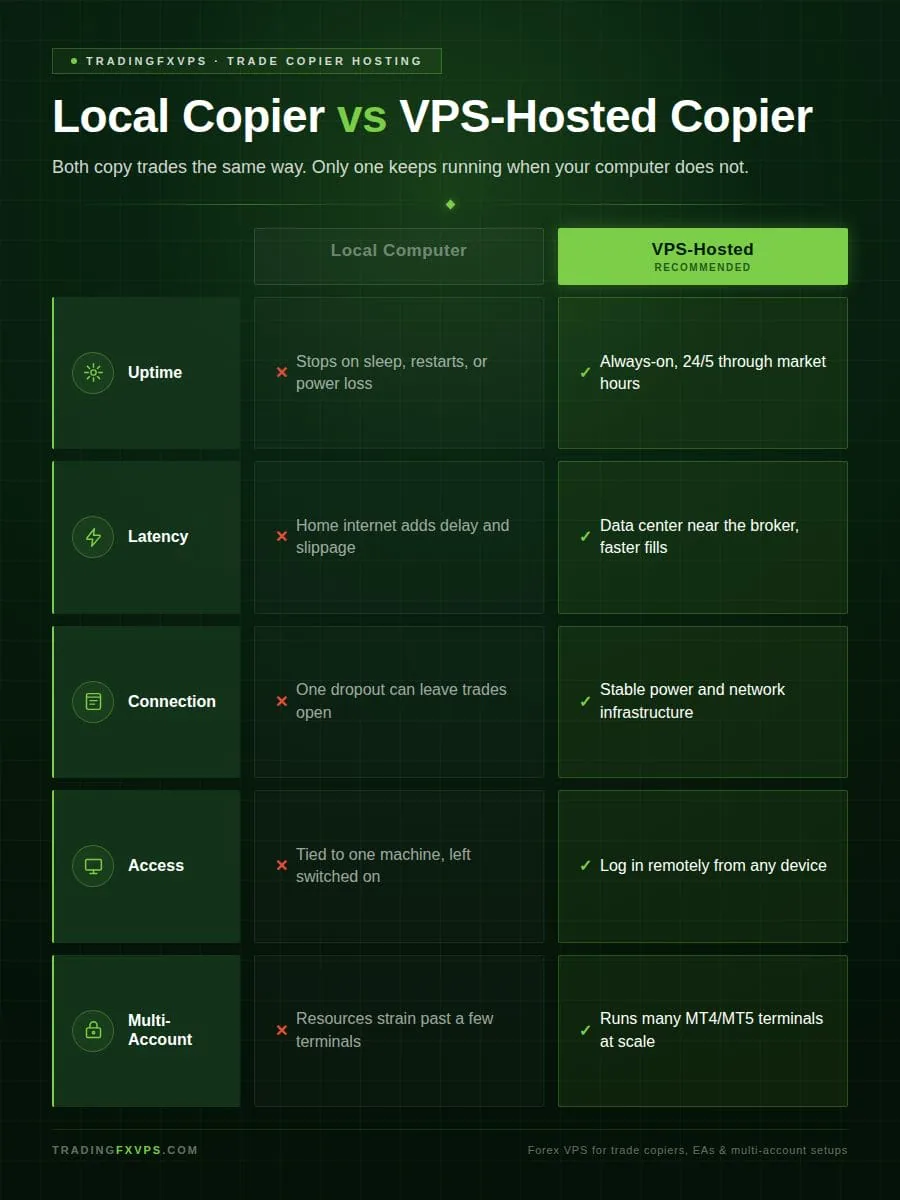
Local Copier vs VPS-Hosted Copier
Both setups can perform the same basic trade copying function, but they offer different levels of reliability.
Running the Copier on a Local Computer
A local setup places the MT4 or MT5 terminals and copier software on the trader’s personal computer. This may be sufficient for testing or for copying trades occasionally.
The problem is that the computer must stay powered on, connected to the internet, and logged in to every broker. The copier may stop working if:
- The computer enters sleep mode
- Windows restarts after an update
- The internet connection drops
- MetaTrader freezes or closes
- A power interruption occurs
A missed entry is inconvenient, but a missed closing instruction can be more serious. It may leave a destination position open after the master has already exited.
Running the Copier on a VPS
Using a VPS moves the platforms to a remote server designed for continuous operation. The trader can disconnect from the remote desktop without closing MT4, MT5, or the copier.
A VPS-hosted setup provides several advantages:
- Always-on operation during market hours
- Stable power and internet infrastructure
- Remote access from different devices
- Support for multiple platform installations
- Lower latency when located near the broker
- Less dependence on a home computer
Not every product requires a separate trading VPS. A cloud-based or web-based provider may operate the copying infrastructure for the trader.
Duplikium, for example, offers cross-platform trade replication for platforms such as MetaTrader, cTrader, and supported TradingView connections. Traders should check how a service connects to their accounts before assuming they must install a traditional local copier on their own server.
What to Look for in a Copier VPS
The best trade copier setup depends on the number of accounts, trading frequency, platform requirements, and location of the brokers involved.
Server Location and Latency
Choose a VPS region close to the broker servers used by the connected accounts. A server near the trader’s home is not necessarily the fastest choice.
When different brokers host their systems in separate regions, test several VPS locations. Look for a stable connection rather than focusing only on the lowest advertised ping.
Enough Resources for Every Terminal
Each instance of MetaTrader 4 or MetaTrader 5 requires processor power and memory. Charts, indicators, EAs, and other trading tools increase resource usage.
A VPS that handles two terminals may struggle with ten. Review the provider’s VPS plans and leave extra capacity for busy market periods. An overloaded server can cause the copier to slow down or stop responding.
Reliability and Security
Look for high uptime, secure remote desktop access, responsive technical support, and backup or snapshot options. Use strong passwords and limit server access to trusted users.
The copier should also offer the key features required by the strategy, such as:
- Fixed lot and proportional scaling
- Symbol mapping
- Maximum-slippage controls
- Reverse copying
- Trade and account filters
- Emergency closing controls
- A clear monitoring dashboard
Test entries, modifications, partial closes, and full exits on demo accounts before using the system with live funds. Traders using a prop firm should also review the firm’s rules on automation, account sharing, and trade replication.
Once the copier has been tested, the final step is choosing a server that can keep it running reliably. We offer forex VPS plans built for MetaTrader, EAs, and multi-account trading setup. Get in touch to find the right fit.
FAQ
Can a VPS copy trades between different brokers?
Yes. A VPS can copy trades across different brokers as long as the copier supports those brokers, platforms, and account types. Use symbol mapping to match instruments and risk settings to handle differences in lot sizes, leverage, and trading rules.
How many accounts can one VPS copy to?
It depends on four factors: your copier license, VPS resources (CPU and RAM), the number of open terminals, and trading frequency. Some copiers cap connected accounts; others scale to dozens. Add server resources as you add accounts.
Does the copier need to stay logged in?
Yes. The master and receiver terminals must stay open, connected, and running with automated trading enabled. You can safely disconnect from Remote Desktop, but closing MetaTrader or shutting down the VPS stops trade copying.